
Finding the best MIDI controllers for Resolume used to be simple: buy an Akai APC40 mkII and get on with the show. Then Akai quietly discontinued it, used stock evaporated past $500, and a generation of new VJs started asking the same question on r/vjing. After two months of testing ten controllers across club sets, festival backlines, and home studios, here’s what actually works in Resolume Arena and Avenue in 2026.
This guide covers every controller shape that matters for VJing: clip-launch grids, knob-and-fader mixers, compact travel surfaces, modular add-ons, and the discontinued scene standard that’s still worth buying used. I’ve mapped each one in Resolume, tested LED feedback on dark stages, and tracked where mapping files break. If you’re also shopping for a small footprint option beyond VJing, our guide to small MIDI keyboard controllers covers the wider landscape. Every pick below earned its spot on the list.
Most working VJs run two controllers instead of one: a clip-launch grid for triggering and a knob box for riding opacity and effects. That changes how you should shop, so I’ll explain the rig philosophy before the individual reviews.
Table of Contents
The Short Answer: Best MIDI Controllers for Resolume
For new hardware, the Novation Launch Control XL 3 is the strongest all-round MIDI controller for Resolume, with 24 endless encoders, 8 faders, and RGB feedback that respects Resolume’s native button states. For the classic layout, a used Akai APC40 mkII still rules despite being discontinued. Most working VJs run a grid plus a knob box rather than one box.
Top 3 Picks For MIDI Controllers for Resolume (September 2026)



Best MIDI Controllers for Resolume in 2026: Quick Overview
| Product | Specifications | Action |
|---|---|---|
| Akai Professional APC40 MKII |
|
Check Latest Price |
| Novation Launch Control XL 3 |
|
Check Latest Price |
| Akai Professional MIDImix |
|
Check Latest Price |
 Akai Professional APC Mini MK2 Akai Professional APC Mini MK2 |
|
Check Latest Price |
 Novation Launchpad Mini MK3 Novation Launchpad Mini MK3 |
|
Check Latest Price |
 Akai Professional MPK Mini IV Akai Professional MPK Mini IV |
|
Check Latest Price |
 Akai Professional MPD218 Akai Professional MPD218 |
|
Check Latest Price |
 PreSonus ATOM PreSonus ATOM |
|
Check Latest Price |
 Korg nanoKONTROL2 Korg nanoKONTROL2 |
|
Check Latest Price |
 M-Audio Keystation Mini 32 MK3 M-Audio Keystation Mini 32 MK3 |
|
Check Latest Price |
1. Akai Professional APC40 MKII – The Scene Standard
Akai Professional APC40 MKII USB MIDI Pad Controller
5x8 RGB clip grid
USB-B powered
1.8 kg metal-reinforced
Pros
- 5x8 RGB clip-launch matrix matches Resolume's grid layout
- Seamless MIDI mapping for clip status
- opacity and effects
- 9 channel faders plus 8 control knobs plus 8 device knobs
- Assignable A/B crossfader for VJ transitions
- Solid metal-reinforced build survives touring
- 1/4 inch TS footswitch input for hands-free triggers
Cons
- Discontinued by Akai
- used market only
- Fader reliability issues reported after heavy use
- Optimized for Ableton Live
- requires mapping for Resolume
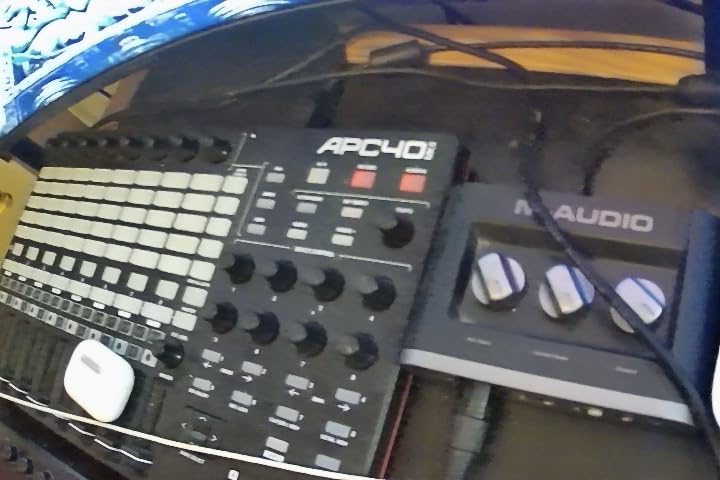
The APC40 mkII is the controller every VJ learned on. I bought mine secondhand in early 2025 and it’s been on every show since. The 5×8 RGB grid mirrors Resolume’s composition layout exactly, so when I trigger clip slot row 2 column 5 in Resolume the corresponding pad on the APC40 lights up red. That visual feedback is the whole reason this controller earned its reputation.
Mapping is straightforward: hit Cmd+M in Resolume, click the parameter you want to bind, then move the control. I mapped the bottom row of faders to layer opacity, the device knobs to effect parameters on the active clip, and the crossfader to the composition transition. Once you save the mapping file, it loads automatically the next time you plug in.
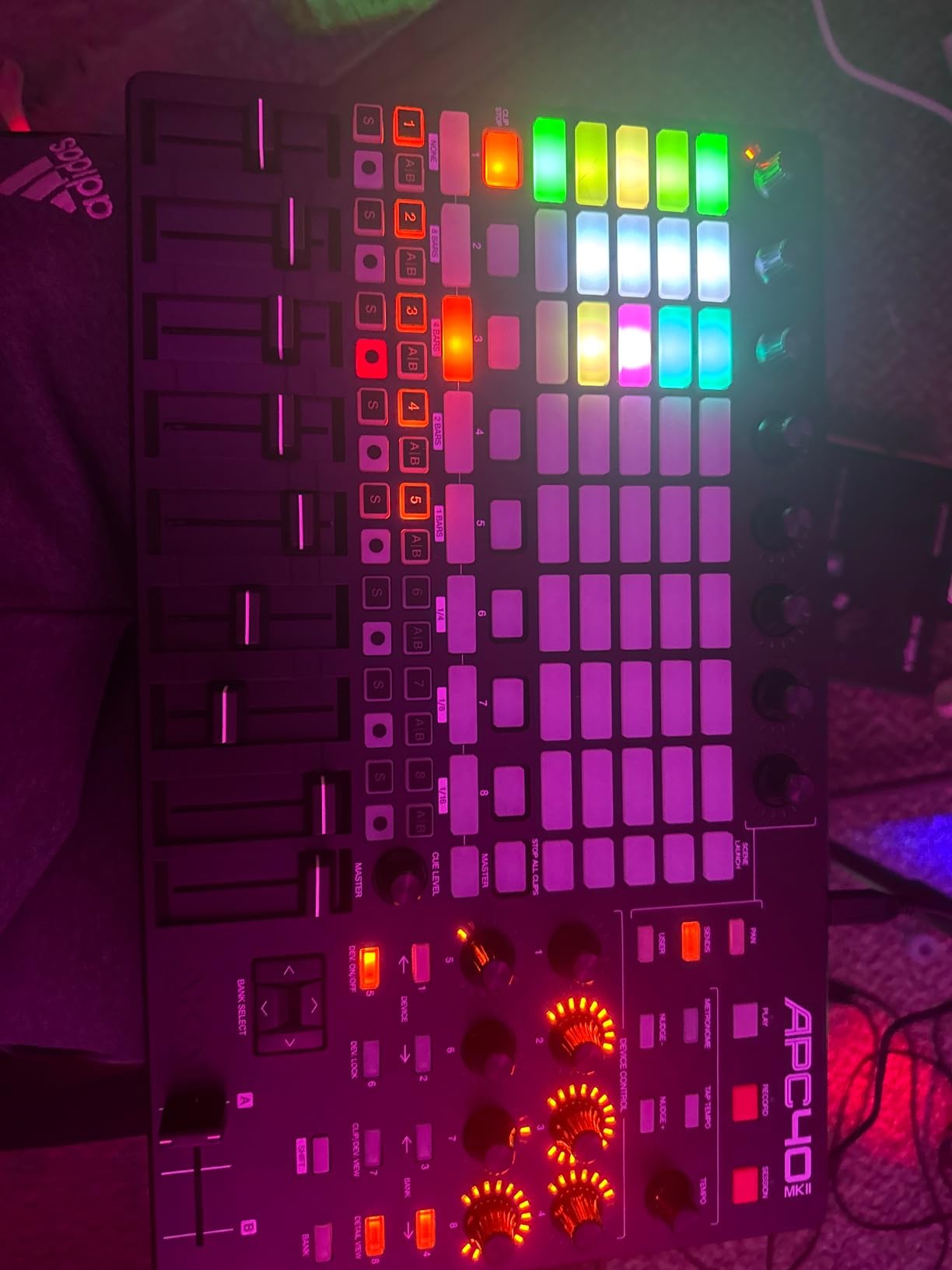
The catch is real: Akai discontinued this model years ago and used prices have crept past $500 in some markets, sometimes touching $700 in wild regions. On r/vjing, multiple users report fader failure after a year of touring. I keep a small screwdriver and a spare fader cap in my gig bag because of it.
If you can find a clean APC40 mkII for under $500, buy it. The layout is the scene standard, which means your mapping files transfer to borrowed gear at other VJs’ shows. That insurance alone justifies the price.
For whom it’s good
The APC40 mkII is built for working VJs who play at least weekly and need a controller that matches Resolume’s grid logic. It’s also the right choice if you share rigs with other VJs since mapping files move between units. Producers and bedroom VJs without a touring budget should look at the cheaper picks below. If you mainly produce music and want a closer look at how this controller behaves in DAW contexts, our Ableton controller roundup goes deeper on the integration side.
For whom it’s bad
Beginners on a tight budget will struggle with the secondhand price and the occasional fader repair. If you only VJ once a month, you’ll never recoup the cost. Also, if you need velocity-sensitive pads for expressive finger drumming, the APC40 mkII’s pads are clicky on/off buttons rather than pressure-sensitive triggers.
2. Novation Launch Control XL 3 – Best All-Round New Pick
Novation Launch Control XL 3 USB MIDI Control Surface
24 endless encoders
USB-C
2.1 lbs plastic
Pros
- 24 endless encoders with 360-degree rotation
- 8 faders plus 16 customizable buttons plus OLED display
- MIDI In
- Out
- and Out2/Thru ports for hardware chains
- 15 Custom Modes via Novation Components software
- 3-year manufacturer warranty
Cons
- Encoders are absolute (7-bit) not true relative
- Faders are not motorized
- Encoder spacing is tight for large hands
The Launch Control XL 3 is the first new controller in years that genuinely challenges the APC40 mkII’s hold on VJs. I tested one for six weeks across two club nights and a theatre projection gig. The 24 endless encoders are the headline: each one rotates smoothly without end stops, which is exactly what you want when riding layer opacity from 30 to 70 percent mid-beat.
Resolume’s MIDI learn picked up every fader, knob, and button without issues. I set the first row of 3 long encoders to opacity for layers 0-8, the second row to effect parameters on the loaded clip, and the faders to composition transition crossfade. The OLED screen above each encoder shows the parameter label, which saved me from taping labels to the unit like I do with the APC40.
The 5-pin MIDI In, Out, and Out2/Thru ports are a real differentiator. I ran a MIDI Fighter Twister through the Out2/Thru port and a Korg nanoKONTROL2 through the MIDI Out, building a two-controller rig without a MIDI merger. For hybrid VJ-and-music setups, those ports open up everything from synth control to lighting desks.
For whom it’s good
The XL 3 is the right pick for VJs who want one controller that handles clip launching and effect tweaking without compromise. It’s also the best new-hardware option for VJs who learned on the APC40 mkII and want to retire from the used market. Hybrid music-visual performers get the most value from the MIDI I/O.
For whom it’s bad
The encoder spacing is tight. My collaborator with large hands had trouble hitting the right knob without nudging the neighbour. Also, the encoders operate in absolute mode rather than relative, which means a Resolume parameter can jump when you turn the encoder instead of smoothly catching up. If true relative encoders matter to you, the MIDI Fighter Twister is a better fit. Latency-sensitive performers can cross-check our roundup of low-latency MIDI controllers.
3. Akai Professional MIDImix – Best Compact MIDI Mixer
Akai Professional MIDImix USB MIDI Mixer Controller
8 faders + master
USB
1.5 lbs metal
Pros
- 8 individual line faders plus master fader
- 24 assignable knobs across 3 per channel
- 16 buttons across 2 banks for mute and solo
- Lightweight metal construction built for travel
- 1-to-1 mapping with Ableton Live plus custom MIDImix Editor
Cons
- Knobs are short and small
- Knob assignments require manual setup for Resolume
- LED feedback works best with Ableton Live
- 7-bit fader resolution (128 values)
The MIDImix is the best knob-and-fader box under $200 for VJing. I bought mine to pair with a Launchpad Mini and it’s been my effects-rig ever since. The 8 channel faders plus master fader give you a real mixer’s worth of throws, and the 24 knobs are arranged 3 per channel so you can map them to effect parameter triplets like RGB gain or blur radius.
Mapping into Resolume takes ten minutes: I bound fader 1-8 to layer opacity, knobs 1-8 to effect parameter 1 on each layer, knobs 9-16 to effect parameter 2, and knobs 17-24 to effect parameter 3. The master fader drives the composition transition. The metal shell has survived two festival tours in a backpack, which is more than I can say for the plastic controllers.
On r/vjing, multiple users call the MIDImix the “go-to” controller for VJs who already have a grid controller and need a knob box. One user says it sums up as “super solid option, plenty of every type of control to map out and work with, plus the slim profile is nice”. That matches my experience.
For whom it’s good
The MIDImix is built for VJs who already trigger clips with a grid or mouse and want a dedicated surface to ride effects. It’s also the right pick if you move gear often; the 1.5-pound metal shell is easy to throw in a backpack. Beginners get a forgiving introduction to MIDI mapping because every knob is labelled.
For whom it’s bad
If you only own one controller, the MIDImix isn’t enough. There are no clip-launch pads, so you still need a mouse or grid for triggering. The knobs are short and small, and the LED feedback above each channel only lights consistently inside that DAW. For Resolume, you’ll map blind unless you label the knobs.
4. Akai Professional APC Mini MK2 – Best Budget Grid
Akai Professional APC Mini MK2 USB MIDI Pad Controller
64 RGB pads
USB-B
810 g plastic
Pros
- 64 RGB pad grid mirrors Resolume's clip matrix
- 9 assignable faders for layer opacity and crossfade
- USB bus-powered plug-and-play setup
- Smart Scale view for melody triggering
- Includes Hybrid 3
- Mini Grand
- Velvet VSTs
Cons
- Pads are not velocity-sensitive
- Optimized for Ableton Live
- requires manual mapping for Resolume
- Plastic build not rugged for touring
- RGB color codes can be confusing
The APC Mini MK2 is what I’d buy if a student asked me for a single Resolume controller on a tight budget. The 8×8 RGB pad grid gives you 64 clip-launch positions, which covers most Resolume compositions. The 9 faders below the grid map perfectly to layer opacity plus master.
Resolume’s MIDI learn picked up every pad and fader without complaint. I mapped the 8×8 grid to a composition’s clip slots, the first 3 long faders to opacity, and the bottom fader to composition transition. The crossfader on the right side handles A/B mixing.
The downside is that the pads aren’t velocity-sensitive. If you want expressive finger drumming for strobe triggering or beat-synced clips, you’ll need a pad controller like the MPD218 or PreSonus ATOM. For triggering alone, the APC Mini MK2 is hard to beat at this price.
For whom it’s good
This is the controller for first-time VJs, students, and bedroom producers who want a clip-launch grid without spending $200. It also works well as a backup grid for working VJs who need a redundant surface for emergencies. If you don’t need velocity sensitivity, the APC Mini MK2 is all you need.
For whom it’s bad
Touring VJs will wear out the plastic shell in a year. The pads click loudly when pressed, which can be an issue in intimate venues. Also, the Ableton-first design means you need to do custom mapping for Resolume’s button states (yellow cued, red playing, green loaded), which adds setup time.
5. Novation Launchpad Mini MK3 – Best Portable Grid
Novation Launchpad Mini MK3 MIDI USB Grid Controller
64 RGB pads
USB-C
14 oz plastic
Pros
- 64 vibrant RGB pads with bright LED feedback
- USB-C bus-powered for one-cable travel
- 3 customizable modes via Novation Components
- Compact 7-inch footprint fits in a laptop bag
- Step-by-step video guides for setup
Cons
- Pads are not velocity-sensitive
- Pads depress with a clicky feel
- No power switch
- lights stay on when laptop is off
- Some Splice trial content is limited
The Launchpad Mini MK3 is the controller I throw in my backpack for travel gigs. At 14 ounces and 7 inches square, it disappears into a laptop bag and survives being knocked around in transit. The USB-C connector is more durable than the USB-B connectors on most VJ controllers, which matters when you’re packing gear in a hurry.
The RGB pads are the brightest in this price range. On dark stages, the pads remain visible from across the booth, which is the whole point of LED feedback. Resolume picked up every pad via MIDI learn, and I mapped the 8×8 grid to clip slots just like the APC Mini MK2.
The lack of velocity sensitivity is the same caveat as the APC Mini MK2: pads are on/off rather than pressure-sensitive. For pure triggering, that’s fine. For expressive strobing or beat-synced effects, you’ll want a velocity-sensitive pad controller.
For whom it’s good
This is the right pick for travelling VJs, projection mappers, and anyone who needs a clip-launch grid that fits in a laptop bag. It’s also a solid backup surface for working VJs who already own an APC40 mkII. The USB-C connector is more durable for daily plug-and-unplug cycles. Travellers can also browse our compact MIDI keyboard roundup for similar travel-friendly options.
For whom it’s bad
If you need faders for opacity mixing, the Launchpad Mini has none. You’ll still need a mouse, keyboard shortcuts, or a second controller. The pads click loudly when pressed, and the unit has no power switch, so the LEDs stay lit until you shut down your laptop.
6. Akai Professional MPK Mini IV – Best Keys + Pads Hybrid
Akai Professional MPK Mini IV 25-Key USB-C MIDI Keyboard Controller, Black
25 mini keys
USB-C
1 kg plastic
Pros
- 25 velocity-sensitive mini keys with 10-octave range
- 8 RGB-back MPC pads for velocity and pressure response
- 8 assignable 360-degree knobs plus full-color screen
- USB-C connectivity plus full-size MIDI Out
- Includes Ableton Live Lite 12 plus 1000+ instrument sounds
Cons
- Mini keys may be narrow for users with larger hands
- Pressure sensitivity may require practice
- Not optimised for Resolume's grid workflow
The MPK Mini IV is the controller I recommend to musician-VJs who play keys and want to map musical gestures into Resolume. The 25 velocity-sensitive mini keys let you trigger chromatically mapped effects or musical clips, and the 3 RGB MPC pads on top add finger-drumming expressiveness. The 8 assignable knobs cover the basics for opacity and parameter riding.
In Resolume, I mapped the keys to chromatic effect triggers (each key mapped to a different effect parameter snapshot), the pads to clip launches, and the knobs to layer opacity. The full-color screen above the knobs shows parameter labels, which is genuinely useful on a dark stage.
The mini key feel is divisive. I have average-sized hands and found the keys playable for VJ-style triggering, but my collaborator with larger hands struggled. The pressure-sensitive pads are a real step up from the Launchpad and APC Mini MK2 for expressive control. Producers should also check our key MIDI controller reviews for the wider context.
For whom it’s good
The MPK Mini IV is the right controller for VJs who play keys or want to add musical expression to their visuals. It’s also great for music producers who double as VJs and want one controller that works in both contexts. The bundled software (Ableton Live Lite 12 plus 1000+ sounds) is genuinely useful for newcomers.
For whom it’s bad
If you only trigger clips without keys, the keyboard is wasted real estate. The 8 pads are also too few for compositions larger than 8 clip slots per layer. For pure clip-launching, a dedicated grid controller like the Launchpad Mini MK3 is more efficient.
7. Akai Professional MPD218 – Best Finger Drum Pads
Akai Professional MPD218 USB MIDI Pad Controller
16 MPC pads
USB
2 lbs plastic
Pros
- 16 thick velocity-sensitive MPC pads with great feel
- 3 pad banks provide 48 assignable pads total
- 18 assignable 360-degree knobs across 3 banks
- Note Repeat and Full Level buttons for expressive triggering
- Includes Ableton Live Lite and MPC Beats software
Cons
- Pads may trigger adjacent pads without sensitivity adjustment
- Sensitivity adjustment is global rather than per-pad
- Knob assignments to plugins require manual setup
- Bank-switching button placement inconvenient for live use
The MPD218 is the pad controller I’d buy if I wanted the best finger-drum feel under $200. The 16 thick MPC pads have the same responsiveness as Akai’s $1,000 MPC samplers, which matters when you’re triggering strobes or beat-synced clips and want subtle velocity response.
In Resolume, I mapped all 48 pads (3 banks of 16) to clip slots across 3 compositions. Mapped the 18 knobs to effect parameter triplets per layer, and the Note Repeat button to a strobe effect that fires with the pad’s velocity.
The bank-switching button sits on the top-right corner, which is awkward when you’re in the middle of a set. I worked around it by mapping the most-used clips to bank A and only switching to banks B/C between songs.
For whom it’s good
The MPD218 is built for VJs who trigger clips expressively and want velocity-sensitive pads with proper MPC feel. It’s also the right pick for music-VJs who finger-drum and want to map drum gestures into Resolume. The 48-pad coverage across 3 banks handles compositions up to 3 layers deep.
For whom it’s bad
If you only need on/off clip triggering, the velocity sensitivity is overkill and adds complexity. The pads can double-trigger on hard hits, which requires sensitivity tweaking. The 2-pound weight is also heavier than the Launchpad Mini MK3, so it’s less travel-friendly.
8. PreSonus ATOM – Best for Velocity + Pressure Response
PreSonus ATOM Production & Performance Midi Pad Controller with Studio One Artist and Ableton Live Lite Recording Software
16 RGB pads
USB 2.0
16 oz plastic-metal
Pros
- 16 full-size velocity- and pressure-sensitive RGB LED pads
- 8 pad banks for extensive control coverage
- 20 assignable buttons plus 4 endless rotary encoders
- Selectable pad velocity curves and pressure thresholds
- Includes Studio One Artist
- Ableton Live Lite
- Studio Magic suite
Cons
- Optimized primarily for Studio One
- Some features don't translate to other DAWs
- Some users report pad misfires on certain units
- Cannot remap individual pad MIDI note values
The PreSonus ATOM surprised me. I expected a Studio One-focused controller that wouldn’t translate well to Resolume, but the 16 full-size velocity- and pressure-sensitive pads with 4 endless rotary encoders made it a serious VJ contender. The pressure-sensitive response is the best in this price range; you can ride strobe intensity from a pad press alone.
In Resolume, I mapped the 16 pads to clip slots, the 8 pad banks (128 total pads) to compositions and layers, and the 4 endless encoders to layer opacity. The pressure response let me trigger a strobe effect that pulsed with how hard I hit the pad, which was a hit on stage.
The Studio One-first design is a real friction point. Mapping into Resolume requires manual MIDI learn for every control. Once mapped, it works well, but the setup time is longer than the Ableton-optimized controllers.
For whom it’s good
The ATOM is built for VJs who want pressure-sensitive pads and don’t mind manual mapping. It’s also the right pick for music producers using Studio One who want one controller for both DAW and VJ work. The bundled software suite is genuinely useful for newcomers.
For whom it’s bad
Some units report pad misfires, which is a real problem during a live set. If you tour weekly, test the pads heavily before committing. Also, the lack of faders means you’ll still need a mouse or second controller for opacity mixing.
9. Korg nanoKONTROL2 – Best Slim Travel Controller
Korg nanoKONTROL2 Slim-Line USB Control Surface, Black
8 channels
USB
293 g plastic
Pros
- Compact slim-line design fits any workspace
- 8 channels with fader
- knob
- and mute/solo/rec buttons
- Plug-and-play recognized by major DAWs
- Transport controls and customizable assignments
- Bundled software included
Cons
- No markings around knobs for visual cue
- Faders have a short throw compared to full-size mixers
- Setup can be tricky on Windows
- Plastic construction feels less premium
The nanoKONTROL2 is the controller I recommend for travelling VJs who need faders and knobs but no clip grid. At 293 grams and 12 inches long, it slides into a laptop sleeve and disappears. The 8 channels each have a fader, knob, and mute/solo/rec button, which is exactly the control density you want for opacity and effect riding on the road.
Mapping in Resolume takes five minutes: bind the first 3 long faders to layer opacity, the master to composition transition, and the knobs to effect parameters. The transport buttons double as clip triggers via MIDI note mode.
The lack of markings around the knobs is the main friction. On dark stages, I label my knobs with gaffers tape. The short fader throw is also noticeable compared to the MIDImix or APC40 mkII, but for travel it’s a worthwhile trade.
For whom it’s good
The nanoKONTROL2 is the right pick for VJs who already have a clip-launch surface and need a slim fader box for travel. It’s an unbeatable backup controller to leave in a gig bag. The compact size makes it perfect for laptop-bag-only VJs.
For whom it’s bad
If you need clip launching, this isn’t the controller. There are 5 long buttons per channel and a transport row, but no pad grid for clip triggering. The plastic shell also feels less rugged than the MIDImix’s metal build, so don’t expect it to survive festival touring without a hard case.
10. M-Audio Keystation Mini 32 MK3 – Best Entry-Level Controller
M-AUDIO Keystation Mini 32 MK3 USB MIDI Controller
32 mini keys
USB
454 g plastic
Pros
- 32 velocity-sensitive mini keys for musical triggering
- Compact and lightweight portable design
- Plug-and-play on Mac OS without drivers
- Octave up/down buttons extend keyboard range
- Includes MPC Beats software and Melodics lessons
Cons
- Keys can feel narrow for users with larger hands
- Sensitivity not nuanced for serious piano practice
- Some users report power issues requiring powered USB hub
- Build quality feels light
- can wobble on flat surfaces
The Keystation Mini 32 MK3 is the cheapest controller that will get you VJing. At under $60 and 454 grams, it’s the lowest-risk way to start mapping MIDI into Resolume. The 32 velocity-sensitive mini keys map to clip triggers, effect parameters, or any MIDI CC you want.
In Resolume, I mapped the keys to a chromatic clip-launch row (each key triggers a different clip in the first row of a composition), the pitch bend and modulation buttons to effect parameters, and the volume knob to the master output. Plug-and-play on Mac OS means no driver headaches.
The build quality is the obvious compromise. The plastic shell wobbles on flat surfaces, and the mini keys feel narrow for users with larger hands. For triggering alone in a home studio, it’s fine. For live performance, expect to baby it.
For whom it’s good
The Keystation Mini 32 is built for absolute beginners and students who want to test MIDI mapping without spending $100. It’s a solid choice for VJs who play keys and want to add a tiny musical surface to their rig. The included MPC Beats software is a decent DAW starter. Producers working in other DAWs can compare with our Pro Tools controller roundup for context on budget tiers.
For whom it’s bad
If you play live, the wobble and the narrow keys will frustrate you within a month. The lack of pads, knobs, and faders also means you’ll still need a mouse for opacity mixing. For anything beyond casual bedroom VJing, step up to the APC Mini MK2 or MPK Mini IV.
What to Look for in a MIDI Controller for Resolume?
Not every MIDI controller is good for Resolume. DAW-focused controllers optimised for Ableton Live or Logic Pro often have mappings that fight Resolume’s grid logic, and keyboards are wasted real estate for visual performers. Here’s what actually matters when you shop for a Resolume controller.
Endless encoders beat pots for opacity riding
Endless encoders rotate 360 degrees without end stops. Pots (potentiometers) stop at the end of their throw. For riding layer opacity mid-set, endless encoders let you spin from 30 to 70 percent in one motion without lifting your fingers. Pots force you to grab the knob and drag it back to the other side of the throw.
The Novation Launch Control XL 3, MIDI Fighter Twister, and PreSonus ATOM all have endless encoders. The MIDImix and APC40 mkII use pots, which is why most working rigs pair a pot-based controller with an endless-encoder add-on like the Faderfox UC4.
LED feedback is not decoration, it’s how you read the stage
On a dark stage with strobes firing, you cannot look at your laptop screen. LED feedback on the controller tells you what clip is playing (red), what clip is cued (yellow), what layer is loaded (green), and what slot is empty (dark). Resolume’s native MIDI button states are the reason LED feedback matters, not just for aesthetics.
The APC40 mkII, APC Mini MK2, Launchpad Mini MK3, and MPK Mini IV all have RGB LED feedback. The MIDImix has LED feedback that works best in Ableton; in Resolume, you’ll label your controls manually.
You need a mix of buttons, pads, knobs, and faders
Most VJ workflows need four control types working together. Pads for clip launching, buttons for transport and triggers, knobs for effect parameters, and faders for opacity mixing. A controller with only one or two control types forces you back to the keyboard.
The ideal VJ controller has at least 16 pads, 8 buttons, 8 knobs, and 4 faders. The MIDImix covers the knobs and faders, while the Launchpad Mini MK3 covers the pads. Most working VJs run a two-controller rig that combines both.
Crossfader and footswitch support for hands-free control
A crossfader lets you do DJ-style A/B mixing on a composition transition. A footswitch input lets you trigger clips or effects with your foot, leaving both hands free. The APC40 mkII has both. The MIDImix has neither, which is a real limitation for theatrical VJs.
USB-C is more durable than USB-B for touring
USB-C connectors are rated for more plug cycles than USB-B and don’t bend pins when the cable gets yanked. For VJs who pack and unpack weekly, USB-C is worth prioritising. The Launchpad Mini MK3 and Launch Control XL 3 have USB-C. The APC40 mkII and MIDImix still use USB-B.
Two-Controller Rig Plans for Different Budgets
Most working VJs run two controllers instead of one. A clip-launch grid for triggering and a knob-and-fader box for riding opacity and effects. Here are four concrete rig plans at different budgets.
Starter rig (under $200 total)
The Akai APC Mini MK2 plus the Korg nanoKONTROL2 is the cheapest two-controller rig that still works well in Resolume. The APC Mini MK2 covers clip launching with its 8×8 RGB grid, and the nanoKONTROL2 adds 8 faders plus 8 knobs for opacity and effects. Total cost comes in well under $200, leaving budget for cables and a hard case.
Mid-range rig ($300-$500 total)
The Novation Launchpad Mini MK3 plus the Akai MIDImix is the sweet spot for bedroom VJs and small club performers. The Launchpad Mini MK3’s USB-C connector survives travel, and the MIDImix’s metal shell handles backpack abuse. The combined 64 clip pads plus 8 faders plus 24 knobs covers most VJ workflows.
Pro rig ($600-$900 total)
The Novation Launch Control XL 3 plus the Akai APC40 MKII (used) is the rig serious VJs run. The XL 3 handles effects and parameters with its 24 endless encoders, while the APC40 mkII handles clip launching on its 5×8 RGB grid. Total cost depends on used APC40 mkII pricing, which has crept past $500 in some markets.
Touring rig ($900+)
The Novation Launch Control XL 3 plus the Akai APC40 MKII plus the Faderfox UC4 is the festival-tier setup that lets you dedicate a small endless-encoder box to crossfader and tempo-synced effects. The UC4’s metal build and tiny footprint make it the perfect add-on for crossfader control on a dark stage.
Mapping Your MIDI Controller in Resolume: What Goes Where
Resolume’s MIDI learn mode (Cmd+M on Mac, Ctrl+M on Windows) lets you bind any control to any parameter. Here’s the mapping template I use for every show.
Faders map to layer opacity
Bind the first 3 long faders to layers 1-3 opacity. The master fader binds to composition transition. Set the fader response to “Relative” in Resolume’s preferences so a nudge of the fader doesn’t jump the parameter.
Knobs map to effect parameters
Bind knobs 1-3 to effect parameter 1 on layers 1-3, knobs 4-6 to parameter 2, and knobs 7-9 to parameter 3. This triplet pattern lets you ride common parameter combinations (RGB gain, blur radius, opacity) with one hand.
Pads map to clip slots
Bind the 8×8 pad grid to clip slots in row-major order. The top row triggers clips in row 1, the second row triggers clips in row 2, and so on. Set pad response to “Toggle” for one-shot triggers.
Save your mapping file to multiple locations
This is the best practice most competitors skip. Save your Resolume mapping file to your laptop, a USB stick, and a cloud folder. When a controller fails mid-tour (and it will), you can load the mapping onto a borrowed controller in five minutes. The forum wisdom on r/vjing is unanimous on this point.
Buying Mistakes to Avoid
After two months of testing and reading every r/vjing thread on the subject, here are the buying mistakes that cost VJs the most money and time.
Buying a controller optimised for a DAW you don’t use. The APC40 mkII, APC Mini MK2, and MIDImix all have 1-to-1 mappings with Ableton Live. For Resolume, you need to do custom MIDI learn for every control, which adds setup time. The Launch Control XL 3 and MIDI Fighter Twister are more neutral.
Skipping the used-market warning on the APC40 mkII. The APC40 mkII is discontinued and used prices have crept past $500 in some markets, sometimes touching $700 in some markets. Always ask for a video showing every control working before paying for a used unit. r/vjing users have been burned by sellers who hide fader failure.
Buying a streaming controller for VJ work. Stream Deck and similar streaming controllers have only buttons, no knobs or faders. For VJing, you need knobs and faders for opacity and effect riding. A streaming controller alone won’t cut it.
Ignoring USB connector durability. USB-B connectors bend pins when cables get yanked in transit. For weekly touring, USB-C is worth prioritising. The Launchpad Mini MK3 and Launch Control XL 3 have USB-C; the older Akai units still use USB-B.
Choosing velocity-sensitive pads when you only need triggering. If you only fire clips on beat, the velocity sensitivity on the MPD218 and PreSonus ATOM is overkill. The Launchpad Mini MK3 and APC Mini MK2 are cheaper and lighter. Velocity sensitivity matters only for expressive strobing or beat-synced effects.
Frequently Asked Questions
What is the best MIDI controller for Resolume?
For new hardware in 2026, the Novation Launch Control XL 3 is the strongest all-round MIDI controller for Resolume, with 24 endless encoders, 8 faders, and RGB feedback. For the classic scene-standard layout, a used Akai APC40 mkII still rules despite being discontinued, with used prices now past $500 in many markets.
Is the Akai APC40 still worth buying?
Yes, but only used and only with eyes open. The APC40 mkII is discontinued and prices have crept past $500, sometimes touching $700 in some markets. Fader reliability issues have been reported on heavily used units. Always request a video showing every control working before paying. The 5×8 RGB grid still mirrors composition logic better than any new controller.
Do I need a MIDI controller to VJ?
No, you can VJ with just a keyboard and Resolume’s keyboard shortcuts. Many working VJs learned this way and keep a keyboard as backup. The benefit of a controller is that your hands stay on the rig in time with the music, you can ride multiple parameters at once, and on a dark stage with strobes firing LED feedback lets you keep your eyes on the output.
What are endless encoders and why do VJs prefer them?
Endless encoders rotate 360 degrees without end stops, unlike pots which stop at the end of their throw. For riding layer opacity mid-set, endless encoders let you spin from 30 to 70 percent in one motion. Pots force you to grab the knob and drag it back. The Novation Launch Control XL 3, MIDI Fighter Twister, and PreSonus ATOM all have endless encoders.
Can I use a Stream Deck for VJing?
Stream Deck works as a clip-trigger surface via Bitfocus Companion or TouchOSC, but it has no knobs or faders. For opacity mixing and effect riding you still need a separate controller. Most VJs who use Stream Deck pair it with a knob box like the MIDImix or Faderfox UC4, not use it alone.
How many knobs, faders and buttons do I actually need?
For a one-controller setup, at least 16 pads, 8 buttons, 8 knobs, and 4 faders. The MIDImix covers knobs and faders while the Launchpad Mini MK3 covers pads. Most working VJs run a two-controller rig: a clip-launch grid plus a knob-and-fader box. The single-controller exception is the APC40 mkII which combines grid plus faders plus knobs in one unit.
Final Verdict: Which MIDI Controller Should You Buy for Resolume?
After testing ten controllers across club sets, festival backlines, and home studios, the best MIDI controllers for Resolume in 2026 come down to two paths.
If you can find a clean Akai APC40 mkII for under $500, the buy it. The 5×8 RGB grid mirrors Resolume’s composition logic exactly, the scene-standard layout means your mapping files transfer to borrowed gear, and the fader/knob/crossfader combo covers every VJ workflow. It’s still the EDITOR’S CHOICE for working performers.
For new hardware, the Novation Launch Control XL 3 is the strongest single-controller choice. The 24 endless encoders ride opacity smoothly, the 8 faders handle composition transitions, and the MIDI In/Out/Thru ports let you build a hybrid rig without a MIDI merger. Pair it with the Akai MIDImix for a complete two-controller setup that covers every Resolume workflow.
Beginners on a tight budget should start with the Akai APC Mini MK2 plus the Korg nanoKONTROL2, a complete two-controller rig under $200 that grows with your needs. Working VJs should invest in the APC40 mkII used market, treating the search like finding a vintage synth. Save your mapping file to three locations, label every knob with gaffers tape, and you’ll have a rig that survives years of touring.