
The best audio interfaces for home studio work give you clean microphone and instrument connections, dependable monitoring, and enough inputs for the tracks you actually make. For most singers, songwriters, streamers, and two-person podcasts, I would start with the Focusrite Scarlett 2i2 4th Gen because it combines two mic preamps, 24-bit/192kHz resolution, Auto Gain, Clip Safe, Air mode, and support listed for Mac, Windows, and iOS.
An audio interface is the box between your microphones or instruments and a computer. It raises a mic signal with a preamp, converts analog sound into digital audio for recording, then converts playback back for headphones and studio monitors; that is a very different job from a computer headphone jack.
I built this guide from the verified specifications, feature lists, and customer-rating data for all 12 current models below. Rather than pretend every 32-bit label or USB-C port means the same thing, I focus on the decisions that change a home recording session: simultaneous inputs, gain, direct monitoring, loopback, outputs, software, mobile support, and stated driver or latency information.
The short answer is simple: one vocal or guitar at a time needs a compact 2-channel interface; two performers need two mic preamps; synths, hardware, drum machines, and extra monitor routing call for 4×4 or larger I/O. If you make podcasts without a computer, a production console may make more sense than a conventional studio audio interface.
Top 3 picks answer the main home-studio needs in September 2026
These three cover the most common starting points: a straightforward two-input music-production interface, a larger low-latency option for routing and monitoring, and a hybrid choice for creators who move between a computer and mobile device.

Best audio interfaces for home studio in 2026 compare 12 verified options
Read the first two features in each row as the fast filter: they identify the input count or special workflow advantage. Then check the full review before choosing, since a two-input unit can still be the better fit when your sessions are simple and you want fewer controls between an idea and a recorded take.
| Product | Specifications | Action |
|---|---|---|
 SSL 2+ MKII SSL 2+ MKII |
|
Check Latest Price |
 SSL 2 MKII SSL 2 MKII |
|
Check Latest Price |
 MAONO P2 MAONO P2 |
|
Check Latest Price |
 Audient iD24 Audient iD24 |
|
Check Latest Price |
 Focusrite Scarlett Solo Focusrite Scarlett Solo |
|
Check Latest Price |
| Focusrite Scarlett 2i2 |
|
Check Latest Price |
 Focusrite Scarlett 4i4 Focusrite Scarlett 4i4 |
|
Check Latest Price |
 MOTU M6 MOTU M6 |
|
Check Latest Price |
 Focusrite Scarlett 18i16 Focusrite Scarlett 18i16 |
|
Check Latest Price |
 RØDECaster Pro II RØDECaster Pro II |
|
Check Latest Price |
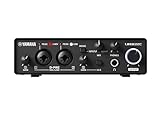 Yamaha URX22C Yamaha URX22C |
|
Check Latest Price |
 PreSonus Quantum ES 2 PreSonus Quantum ES 2 |
|
Check Latest Price |
1. SSL 2+ MKII is the pick for expanded monitor routing
Solid State Logic 2 MKII Plus USB-C Audio Interface 2×4
2 mic preamps
4 balanced outputs
32-bit/192kHz
Pros
- Two discrete headphone outputs
- Four balanced outputs
- Legacy 4K enhancement
- MIDI I/O
Cons
- Two mic preamps only
- No customer-image data
The SSL 2+ MKII is a strong answer for a compact home studio that needs more than one basic monitor path. Its listing specifies two XLR mic preamps, two discrete headphone outs, four balanced DC-coupled TRS outputs, stereo loopback, high-pass filters, 48V phantom power, and five-pin MIDI I/O.
I would put it near the top for a producer who wants a compact front end but uses two headphone feeds or additional output routing. The 32-bit/192kHz AD/DA converter specification and Legacy 4K analog enhancement make it especially interesting for people who want more than plain gain controls without stepping up to a rack-style interface.
For recording a vocalist and guitarist together, the two preamps cover the immediate job. The limitation is growth: additional hardware inputs are not listed, so a setup that regularly tracks a full drum kit needs a larger I/O design.
Its 4.8 rating is based on 358 reviews in the provided product data, a useful signal but not a substitute for matching the output layout to your desk. I also like that the product listing explicitly names Windows and macOS, which is better than assuming a USB-C socket alone settles computer compatibility.
The routing answer is four balanced outputs and two headphones
Four balanced outputs let this model serve a more involved monitor and outboard-routing plan than a basic 2×2 unit. DC-coupled outputs may also matter to a musician working with compatible hardware control-voltage setups, though that is a specialist need rather than a beginner requirement.
The two independent headphone outputs are practical when two people need to hear a take at once. Before buying, map your monitoring path: speakers, headphones, and any external processors should each have a clear connection plan.
The compatibility answer is Mac and Windows bus-powered use
The supplied data lists bus-powered operation with Mac and Windows, so it suits a laptop-centered recording space without a separate power brick in the feature list. It does not list iOS compatibility, so mobile recording should be verified with the manufacturer before you plan around it.
Loopback makes it more useful for a live stream, remote lesson, or software instrument demonstration. That feature routes computer audio into a recordable mix, but the exact software controls and channel behavior should still be checked before an important broadcast.
2. SSL 2 MKII is the focused two-input SSL option
Solid State Logic SSL 2 MKII – 2×2 USB Audio Interface
2 mic preamps
2 headphone outs
32-bit/192kHz
Pros
- Legacy 4K enhancement
- Two headphone outputs
- Stereo loopback
- MIDI I/O
Cons
- Two line outputs
- No listed iOS support
The SSL 2 MKII keeps the core recording chain in a simpler 2×2 layout: two XLR mic preamps, two headphone outputs, two quarter-inch line outputs, 32-bit/192kHz converters, 48V monitoring, loopback, high-pass filters, and MIDI I/O. It is the sensible sibling when you want the SSL feature set but do not need four line outputs.
My take is that two headphone sockets deserve more attention than they get in a small home recording interface. A singer and engineer can monitor together without a splitter, and the front-panel workflow stays centered on a two-source session instead of a large routing matrix.
Legacy 4K analog enhancement is the model’s recognizable tonal feature on paper. The product information does not quantify how much character it adds, so I would treat it as a creative option to audition, not as a replacement for microphone choice, room treatment, or careful gain staging.
Like the SSL 2+ MKII, it has a 4.8 rating from 358 reviews in the supplied data. That shared review count means it is wise to look closely at the output count and your future recording plans rather than treating the rating as the deciding difference.
The recording answer is two sources at the same time
Two microphone preamps mean you can record two vocalists, a vocal and acoustic guitar with separate microphones, or stereo microphones. You can also use instrument and line sources when the front-end configuration supports your session, but it will not replace a multi-channel interface for a band.
For a solo artist, that modest ceiling is often an advantage. Fewer inputs mean faster cable choices and less chance of recording the wrong source onto a track.
The monitoring answer is dual headphones with a basic output layout
Two headphone outputs help collaboration, while the two listed line outputs suit one pair of studio monitors. If you need A/B speaker switching or more external routing, the SSL 2+ MKII or MOTU M6 makes a clearer fit.
The product data lists Windows and macOS but not iOS. I would check driver availability and the supported operating-system version before a purchase, especially after a computer update.
3. MAONO P2 is the mobile-friendly hybrid recording choice
MAONO P2 Hybrid USB Audio Interface Dual XLR for PC Phone iPad Guitar
56dB dual XLR gain
Dual USB ports
24-bit/192kHz
Pros
- Computer and phone connection
- 56dB gain
- MFi-certified ports
- Loopback
Cons
- 41-review sample
- Two channels
The MAONO P2 separates itself from conventional USB audio interface designs with dual USB connectivity designed for a computer and a phone or iPad at the same time. The verified listing also specifies dual XLR inputs, 56dB gain, 24-bit/192kHz audio, -130dB EIN, direct monitoring, loopback, and MFi-certified connections.
I would point a creator who records tutorials, interviews, short-form video, or livestreams from mixed devices toward this model first. The listed operating systems include Android, ChromeOS, Windows, iOS, and macOS, a broader compatibility claim than many units in this guide.
Its 56dB gain figure is meaningful because gain range affects how much level a microphone needs from the preamp. It does not remove the need to set levels sensibly: speak or play at the loudest realistic level, watch the meter, and leave room before clipping instead of recording every peak at the ceiling.
The important restraint is review depth. The supplied data gives it a 4.8 rating but only 41 reviews, so I would weigh the hybrid workflow and documented connectivity more heavily than a small rating sample.
The mobile answer is simultaneous computer and phone or iPad connection
Hybrid dual USB ports can simplify a setup where a phone provides a guest, backing track, camera feed, or companion app while the computer runs recording software. MFi certification is especially relevant for Apple-device users who want an explicitly stated mobile connection path.
Compatibility labels do not replace a pre-session test. Check the cable type, power demands, app input selection, and whether your mobile device needs an adapter before recording a guest remotely.
The microphone answer is 56dB gain with two XLR inputs
The two XLR inputs cover a two-person podcast or a voice-and-instrument session. Its -130dB EIN specification addresses preamp noise, but a quiet room and correct mic placement still contribute far more to a clean spoken-word track.
Direct monitoring is helpful for performers who dislike the delayed feeling of computer playback. It lets you hear the input locally while the computer records, while loopback supports a separate creator workflow for streaming or capture.
4. Audient iD24 is the expandable desktop-studio answer
Audient iD24 USB-C Audio Interface
Class-A preamps
126dB range
ADAT expansion
Pros
- ADAT input and output
- Balanced inserts
- Class-A preamps
- Three-year warranty
Cons
- 96kHz listed maximum
- macOS listed only
The Audient iD24 is built around two Class-A Audient console mic preamps, a 32-bit DAC, 126dB dynamic range, ADAT input and output, and two fully balanced inserts. Those are serious connection choices for a home studio that may add external preamps, compressors, or more channels later.
I would choose it for someone who already understands why ADAT matters, or who expects a two-preamp interface to become the center of an expanding setup. ADAT can carry multiple digital channels from a compatible external preamp, turning a compact desktop unit into a more flexible recording hub without replacing it.
Balanced inserts are equally practical for an owner of physical processing gear. They make it possible to place hardware in a signal path, but that advantage only pays off if you already own or plan to own compatible outboard equipment.
The product data reports a 4.7 rating across 142 reviews and a three-year manufacturer warranty. Its stated operating system is macOS, while no Windows or iOS support appears in the supplied details, so platform verification is an essential pre-purchase step rather than an afterthought.
The growth answer is ADAT expansion for additional channels
ADAT is the feature that changes the iD24 from a two-preamp box into a longer-term studio foundation. Pairing it with a compatible multi-channel ADAT preamp can add recording inputs when a drum kit or multi-mic acoustic session enters the picture.
Do not buy ADAT merely because it sounds professional. If your work is one vocal, one guitar, and occasional overdubs, the extra connection system may add cost and setup steps without improving your recordings.
The control answer is monitor functions and balanced inserts
The iD24 lists assignable monitor control and three programmable function buttons, plus speaker select, talkback, polarity invert, and mono sum controls. These are workflow features that can save clicks when you mix with speakers and headphones daily.
Mono sum is useful for checking whether a mix translates when stereo information collapses. The unit’s documented 96kHz maximum sample rate is enough for most home recording tasks, though it is a different specification from the 192kHz options elsewhere here.
5. Focusrite Scarlett Solo is the simplest one-mic starter
Focusrite Scarlett Solo 4th Gen USB-C Audio Interface
One mic preamp
Hi-Z input
120dB range
Pros
- Air mode
- Loopback
- USB-C bus power
- Three-year warranty
Cons
- One mic preamp
- Single performer focus
The Focusrite Scarlett Solo 4th Gen is for the person who records one microphone and one instrument at a time. Its verified specification list includes one mic preamp, one Hi-Z instrument input, 24-bit/192kHz audio, 120dB dynamic range, loopback, USB-C bus power, improved Air mode, and Mac, Windows, and iOS compatibility.
I would rather see a beginner buy a small interface that matches their actual solo workflow than stretch for empty inputs they will not touch. A singer-songwriter can connect a vocal mic, plug a guitar into the dedicated instrument input, overdub each part, and keep the desktop free of unused connections.
The Air mode is intended to add presence for vocals and guitars, while loopback opens a route for capturing computer audio in streams or content. The included software list names Pro Tools Intro+, Ableton Live Lite, Cubase LE, and the Hitmaker Expansion bundle, which gives a new user more than one route into a first session.
There are 2.5k+ reviews in the source data with a 4.6 rating, and 83% are five-star. That is a broad user sample, but the physical constraint remains: this is not the interface for two XLR microphones at the same time.
The beginner answer is one microphone plus one guitar input
A single mic preamp is enough for vocal tracking, voiceover work, a solo podcast, and one-mic acoustic recordings. The separate Hi-Z instrument input matters for electric guitar or bass because it is designed for the signal level from a pickup.
For an acoustic guitar and vocal recorded simultaneously with two microphones, move up to the Scarlett 2i2 or another two-preamp model. That one choice avoids the common frustration of discovering an input shortage after the microphone cables are already on the desk.
The software answer is several starter DAW options
Pro Tools Intro+, Ableton Live Lite, and Cubase LE are named in the product data. Software bundles can be a meaningful part of a home recording interface package, but register the product and read current license terms before planning a project around a particular application.
For first-time setup, install the recording software, select the Scarlett as input and output, choose a safe sample rate, then record a short test. Listen through headphones before you add plugins, virtual instruments, or complex routing.
6. Focusrite Scarlett 2i2 is the best all-round two-preamp choice
Focusrite Scarlett 2i2 4th Gen USB-C Audio Interface
2 mic preamps
Auto Gain
Clip Safe
Pros
- 120dB dynamic range
- Air mode
- iOS listed
- Starter software bundle
Cons
- Two inputs only
- No expanded I/O
The Focusrite Scarlett 2i2 4th Gen earns the broad recommendation because it covers the sessions most people make at home without becoming complicated. It has two ultra-low-noise mic preamps, two instrument and line inputs, 24-bit/192kHz resolution, 120dB dynamic range, Air mode, Auto Gain, Clip Safe, and USB connectivity.
For the best audio interfaces for home studio search, this is the practical default if you record two sources at once. Two vocal mics, a singer and guitar, a stereo mic pair, or a guest podcast setup all fit its two-preamp design without resorting to adapters or a compromised capture plan.
Auto Gain can set a starting level automatically, while Clip Safe is designed to protect against clipping. Those features speak directly to one of the recurring beginner problems in forum discussions: gain staging confusion; they are assistance, not permission to ignore meters or record in a loud untreated room.
The product data lists a 4.6 rating from 2.5k+ reviews and says users praise easy setup and automatic gain tools. It also lists Mac, Windows, and iOS compatibility, which makes it a sensible candidate for a laptop-and-tablet studio after you confirm your exact device connection.
The two-source answer is vocals, instruments, and guests
Two inputs are the dividing line between a solo-only interface and a flexible small-session interface. They let you retain separate tracks for editing, panning, processing, and level changes rather than committing two performers to one shared recording.
They do not mean four microphones or a drum kit. If you need several mic channels in one take, choose the Scarlett 18i16, an ADAT-expandable device, or another larger interface before the session begins.
The safety answer is Auto Gain and Clip Safe
Auto Gain is useful when a person is still learning how hard to sing, speak, or strum into a mic. Clip Safe adds another guard against overload, but its real benefit is less time lost to a take that cannot be repaired cleanly.
Set a repeatable routine anyway: use 48V phantom power only for microphones that need it, test the loudest part of the performance, and listen for distortion in both the direct signal and recorded playback. That routine works on every interface, regardless of automatic features.
7. Focusrite Scarlett 4i4 is the compact hardware-friendly upgrade
Focusrite Scarlett 4i4 4th Gen USB-C Audio Interface
4-in/4-out
MIDI I/O
Auto Gain
Pros
- Four inputs and outputs
- MIDI I/O
- Air mode
- Clip Safe
Cons
- Two mic preamps
- More connections to manage
The Focusrite Scarlett 4i4 4th Gen adds the routing that small hardware-based studios tend to outgrow first. Its verified features include a 4-in/4-out USB-C design, two ultra-low-noise mic preamps with Air, two Hi-Z instrument inputs, four line inputs, four line outputs, MIDI I/O, 24-bit/192kHz resolution, Auto Gain, and Clip Safe.
I would choose it over the 2i2 when a synth, drum machine, external effect, second monitor route, or MIDI controller is part of weekly work. The connection count gives a home recording interface more room to interact with hardware rather than treating the computer as the only sound source.
It still offers only two mic preamps, so it is not a four-microphone tracking interface in the way its 4×4 label might suggest. The additional connections are line-level and output routing advantages, which are extremely useful for electronic music production and less important to a singer with one microphone.
The source data gives it a 4.6 rating from 520 reviews, with 82% five-star ratings and praise for expanded I/O and MIDI. Its listed operating systems are Mac, Windows, and iOS, helping it fit a desktop setup that also needs tablet access.
The hardware answer is four line paths plus MIDI I/O
Four line inputs let a producer bring external stereo sources or more hardware into a computer-based arrangement. MIDI I/O can connect older gear that uses five-pin MIDI, letting the computer send timing or note data while the interface handles audio.
Draw the signal flow before connecting anything. Audio cables and MIDI cables carry different information, and confusing the two is a common reason a newly connected synth makes no sound in a DAW.
The monitor answer is more outputs for a flexible desk
Four line outputs give more routing flexibility than a basic monitor pair. Depending on the studio, that can mean alternate outputs, external processing, or connections to additional playback equipment.
More outputs do not automatically create a dedicated speaker A/B control or separate headphone mixes. Read the current control software documentation if those particular monitoring jobs are the reason you are considering this model.
8. MOTU M6 is the low-latency multi-I/O monitoring choice
MOTU M6 6×4 USB-C Audio Interface with Studio-Quality Sound
6x4 I/O
2.5 ms latency
ESS Sabre32 DAC
Pros
- Stated 2.5 ms latency
- A/B monitor switch
- LCD meters
- Loopback
Cons
- Larger desktop footprint
- 126-review sample
The MOTU M6 is a 6×4 USB-C audio interface with a feature list that directly addresses monitoring and latency. It specifies ESS Sabre32 Ultra DAC technology, 120dB dynamic range on line outputs, -129dBu EIN on mic inputs, 2.5ms round-trip latency at 96kHz, loopback, an A/B monitor switch, and two professional headphone outputs.
I see it as a very strong fit for a producer with several active sources who also wants visual feedback. The color LCD provides level meters for all channels, a much clearer way to spot an unexpectedly hot input than guessing from a small LED.
Its stated 2.5ms round-trip latency is specific to 96kHz, which is exactly how latency information should be read: as a measured condition, not a number that applies at every buffer size, computer, driver version, and plugin load. Real-world latency varies, so test your own session at a comfortable buffer before recording a performance that depends on live software monitoring.
The supplied data lists Windows, iOS, and macOS compatibility, a 4.6 rating from 126 reviews, and stand-alone operation capability. The physical dimensions are larger than most compact two-input interfaces, so check desk space if your recording setup is built around a narrow laptop table.
The latency answer is a stated 2.5ms round trip at 96kHz
Low round-trip latency matters when a guitarist monitors amp simulation or a singer hears effects from the DAW. At the stated 96kHz condition, 2.5ms is a useful published benchmark, but it should not be compared casually with unspecified figures from other interfaces.
Direct monitoring can avoid perceived delay by monitoring the input before it travels through the computer. Use software monitoring only when you need to hear the DAW effects as part of the performance, and disable duplicate paths that create an echo.
The mixing answer is A/B monitors and detailed LCD metering
An A/B monitor switch makes it easier to compare a mix on two speaker pairs without changing cables. That is a useful translation check for someone who balances music on one set of monitors but wants a second reference.
Full-channel LCD metering helps with gain staging across a busy setup. Keep source signals clear of clipping at the interface, then leave headroom in the DAW; clean levels provide more useful mixing choices than a hot file that has already distorted.
9. Focusrite Scarlett 18i16 is the multi-source home-studio hub
Focusrite Scarlett 18i16 4th Gen USB-C Audio Interface
18-in/16-out
69dB gain
ADAT and S/PDIF
Pros
- Extensive I/O
- Four controllable preamps
- ADAT expansion
- 122dB range
Cons
- Requires external power
- More than small setups need
The Focusrite Scarlett 18i16 4th Gen is the point where a home studio can begin to handle a much wider group of instruments and recording situations. The listing specifies 18 inputs and 16 outputs, four remote-controllable ultra-low-noise mic preamps, 69dB gain, eight line inputs, ADAT and S/PDIF connectivity, MIDI I/O, and 24-bit/192kHz converters with 122dB dynamic range.
I would reserve it for a producer who has clear simultaneous-input requirements: multiple musicians, hardware instruments left connected, or planned ADAT expansion. Buying a large interface for occasional solo voiceover is needless complexity, but buying too few inputs for recurring sessions means constant swapping and missed takes.
Four mic preamps are enough for many small acoustic sessions, while digital expansion can take the channel count beyond that. Air mode, Auto Gain, and Clip Safe carry over familiar Focusrite workflow help to a larger production context.
The product data lists a 4.5 rating from 247 reviews and Mac, Windows, and iOS support. It includes an external power supply, which makes sense for its I/O count but means it is less grab-and-go than a bus-powered interface.
The capacity answer is four preamps plus 18 input paths
The four onboard preamps matter most when you want several microphones active together. Eight line inputs then provide a place for keyboards, drum machines, preamps, or other line-level gear without consuming a microphone input.
The 18-input total includes digital connectivity, so read the manual before assuming every channel appears as a physical analog socket. This distinction keeps an I/O label from creating the wrong expectation about what can be plugged in directly.
The expansion answer is ADAT, S/PDIF, and MIDI
ADAT can add channels through a compatible external preamp, while S/PDIF provides another digital connection option. MIDI I/O supports external instruments and controllers that use traditional MIDI ports.
This is a home recording interface for a system that is already becoming a studio ecosystem. Label cables, save routing presets, and document the input map; organization becomes part of reliable recording when many sources stay connected.
10. RØDECaster Pro II is the computer-optional podcast production answer
RØDE RØDECaster Pro II All-in-One Audio Production Studio
Four combo inputs
Dual USB-C
SMART pads
Pros
- Record without computer
- Bluetooth connectivity
- APHEX processing
- Four preamps
Cons
- Learning curve noted
- Some reliability concerns
The RØDE RØDECaster Pro II is not a typical small interface; it is an all-in-one production solution for podcasting, streaming, music production, and content creation. Its listing specifies four Neutrik combo inputs with Revolution preamps, dual USB-C, Bluetooth and Wi-Fi, eight customizable SMART pads, APHEX processing, and recording to microSD, USB, or a computer.
I would choose it for a creator who needs to produce a show quickly with guests, sound triggers, phone contributions, and recording away from a DAW. The ability to record directly to microSD or external storage is the big workflow difference: it can operate as the production center rather than just a converter attached to a computer.
Its processing includes compressor, de-esser, high-pass filter, noise gate, EQ, Aural Exciter, Big Bottom, and Compellor. Those tools can speed up a spoken-word chain, though a beginner should add them one at a time and listen carefully rather than stacking every processor by default.
The source data shows a 4.4 rating from 1.2k+ reviews, with praise for all-in-one convenience but a 10% one-star share and reports of setup complexity. That is a reason to plan time for firmware, routing, and a full practice recording before a live show.
The standalone answer is direct recording to microSD or USB
Direct media recording makes the RØDECaster Pro II practical for a podcast table, remote interview, or content session where a computer would be distracting. It also creates a useful backup option when configured correctly.
Record a short rehearsal and check the saved file on another device. Standalone operation is only helpful when you know the media format, available space, input routing, and file destination before the conversation starts.
The show-control answer is four inputs with eight SMART pads
Four combo inputs can serve a small panel or multi-host podcast. Eight pads with eight banks provide 64 available actions according to the product data, which can hold sounds, cues, mix actions, or other programmed functions.
That breadth is an advantage for repeatable productions and a burden for someone who only wants to record one vocal and guitar. Pick it for its production workflow, not merely because it has more features than a standard music-production interface.
11. Yamaha URX22C is the DSP-monitoring guitar and vocal option
Yamaha 2-in/2-out USB-C Audio/MIDI Interface with 32-bit/192kHz Support, 2 combo Inputs, DSP-Powered Mixing/Effects, Steinberg Software Suite, Black URX22C
2 D-PRE preamps
DSP monitoring
32-bit/192kHz
Pros
- REV-X and amp effects
- MIDI I/O
- Metal housing
- iOS listed
Cons
- 2x2 analog I/O
- 14-review sample
The Yamaha URX22C offers two XLR/TRS combo inputs with Class-A D-PRE mic preamps, 48V phantom power, one Hi-Z input, two TRS main outputs, MIDI I/O, and 32-bit integer/192kHz USB 3.0 audio. Its defining feature is DSP-powered latency-free monitoring with REV-X reverb, Channel Strip, and Guitar Amp Classics.
I would consider it for a guitarist or vocalist who wants to hear an effected performance without relying only on a computer plugin chain. DSP monitoring puts selected effects inside the interface workflow, which can make a tracking setup feel more immediate.
The full-metal housing is a practical durability detail for an interface that travels between rehearsal and a desk studio. Cubase AI, Steinberg Plus, and the dspMixFx application are listed as included software, giving the buyer a defined software ecosystem from the start.
The provided data lists Windows, macOS, and iOS, a 4.4 rating, and just 14 reviews. I would view the small review base cautiously while giving real weight to the documented DSP and D-PRE features if they match your exact recording style.
The effects answer is DSP-powered direct monitoring
DSP-powered monitoring can provide REV-X reverb, a channel strip, and guitar amp processing while tracking with latency-free monitoring as specified. That can help a performer respond to a more musical headphone sound without committing those choices permanently to a recorded track.
Confirm whether a monitoring effect is being recorded or only heard in headphones before a take. Keeping a dry safety track is often the more flexible choice for a mix later.
The connection answer is two combo inputs and MIDI I/O
Two XLR/TRS combo inputs accommodate a pair of microphones or a microphone and compatible line-level source, while the dedicated Hi-Z input welcomes guitar or bass. MIDI I/O gives external keyboards and hardware a timing connection path.
Two analog inputs remain the boundary of the design. It is capable for focused overdubs and duo sessions, but a multi-mic drum recording calls for a higher-channel interface.
12. PreSonus Quantum ES 2 is the high-gain guitar recording choice
PreSonus Quantum ES 2 USB-C Audio Interface with Fender Studio Pro Software
75dB gain
Fender instrument input
Auto Gain
Pros
- High-gain preamps
- Studio One Pro license
- Low-latency driver
- Loopback
Cons
- Two channels only
- iOS support not listed
The PreSonus Quantum ES 2 puts its strongest claims around gain, instrument recording, and a software starting point. The listing names two MAX-HD mic preamps with +75dB gain, a Fender co-developed instrument input, a custom low-latency driver, Auto Gain, LED metering, loopback, and a Studio One Pro perpetual license.
I would look here if your microphone needs substantial clean gain or if guitar and bass are central to the home studio. The 75dB gain specification is notably high in this group, but as with any preamp, use only the level required for a healthy recording instead of treating maximum gain as a target.
The Fender-developed instrument input gives this model a direct connection to guitar-focused work. Two balanced quarter-inch TRS main outputs and a high-power headphone output provide the basic monitoring foundation, while the Universal Control app is listed for mobile and desktop control.
The product data lists Windows and macOS, a 4.2 rating from 223 reviews, and 70% five-star ratings. iOS support is not listed, so mobile users should not assume the mobile-control claim means mobile audio-interface compatibility.
The gain answer is two MAX-HD preamps rated at 75dB
More available gain can be helpful with microphones that have a low output level, but every mic, voice, and room is different. The goal is a clear recording with headroom, not a knob position that looks impressive.
Auto Gain can establish a starting point, and responsive LED metering helps confirm what the source is doing. Listen for room noise and plosives as well as level; a clean preamp cannot remove every problem before the signal reaches it.
The guitar answer is a Fender co-developed instrument input
The stated Fender collaboration makes this one of the more targeted guitar interface home studio choices in the list. A proper instrument input helps a guitar or bass connect without an added DI box in many straightforward recording setups.
Its two-channel design works for a vocal-and-guitar creator or overdub-based songwriter. If your music needs multiple players recorded live, select input capacity first and add guitar-specific processing later.
How to choose an audio interface starts with the inputs you record together?
Choose by simultaneous sources, not by the largest number printed on a product page. A one-mic voiceover artist can use a single-preamp interface; a singer and guitarist tracking together need two inputs; a small podcast needs one mic input per speaker; and multi-mic instruments need a larger unit or digital expansion.
Make a short list of every source you expect to record at once. Include microphones, guitars, keyboards, stereo gear, and a click or backing-track playback path; that list exposes whether you need a simple 2×2, a 4×4 with line routing, or a higher-capacity hub.
The preamp answer is clean gain and 48V when your microphone requires it
A mic preamp amplifies a low microphone signal to a level your converter can record. Gain figures such as 56dB, 69dB, or 75dB describe available amplification, while EIN is a specification related to preamp noise; neither number matters as much as correctly matching the microphone and setting level without clipping.
Phantom power is 48V power sent through an XLR cable to microphones that need it, commonly condenser microphones. Turn it on only when the microphone documentation calls for it, connect cables with levels down, and never treat it as a general sound-quality switch.
The monitoring answer is direct monitoring for a delay-free performance path
Latency is the time between making a sound and hearing it back through a computer. Direct monitoring gives you a local input feed and avoids much of that delay, while a low buffer setting and stable driver can make DAW monitoring workable when you need to hear plugins.
Do not compare latency claims without their conditions. The MOTU M6, for example, states 2.5ms round-trip latency at 96kHz, but buffer size, sample rate, computer load, operating system, and driver version all affect what you feel in a real session.
The driver answer is to verify your exact computer before ordering
Forum discussions repeatedly flag driver and compatibility worries because a good interface is useless if it will not stay connected in the owner’s daily setup. Check the manufacturer’s current downloads page for your operating-system version, connection type, and DAW before purchasing.
USB-C describes the connector shape, not a guarantee of identical protocol, power, or driver behavior. After setup, make a short test project at the sample rate you intend to use, record a few minutes, restart the computer, and confirm the interface reconnects properly.
The mobile answer is to rely only on expressly listed device support
Several options here list iOS support: the MAONO P2, Focusrite Scarlett Solo, Focusrite Scarlett 2i2, Focusrite Scarlett 4i4, MOTU M6, Focusrite Scarlett 18i16, and Yamaha URX22C. The MAONO P2 additionally lists Android and MFi-certified connectivity, while other products do not state every mobile platform in the supplied information.
Bring power planning into a mobile setup. A bus-powered interface, a phone, a tablet, and a condenser microphone can impose different power needs, so test the exact cable and adapter combination before a location recording.
The software answer is a bundle that gets you recording, not a reason to ignore workflow
Several models include named software: Focusrite lists Pro Tools Intro+, Ableton Live Lite, Cubase LE, and Hitmaker Expansion on applicable Scarlett models; Yamaha lists Cubase AI and Steinberg Plus; MOTU lists Performer Lite and Ableton Live Lite 11; SSL lists its Production Pack; and PreSonus lists a Studio One Pro perpetual license.
Software is a useful starting point, particularly for a new producer, but choose the interface around inputs, monitoring, and compatibility first. Download, register, and open the software before a session so activation details do not interrupt the creative work.
Frequently asked questions answer the first home-studio decisions
What is the best audio interface for a home studio?
The Focusrite Scarlett 2i2 4th Gen is the best all-round choice for most home studios because it has two mic preamps, 24-bit/192kHz resolution, Air mode, Auto Gain, Clip Safe, and listed Mac, Windows, and iOS compatibility. Choose a larger unit when you need more than two simultaneous inputs or expanded routing.
How much should I spend on an audio interface for home recording?
Spend according to the inputs, monitoring, and computer compatibility you need rather than a fixed amount. A compact two-input interface suits solo vocals, guitar, and two-person recording, while money spent on unused channels is usually better reserved for a microphone, headphones, or room treatment.
Do I need an audio interface for home studio?
You need an audio interface if you want to connect XLR microphones, guitars, studio monitors, or headphones with proper level control to a computer. It provides microphone preamps, analog-to-digital conversion, monitoring, and lower-latency options that a built-in computer sound connection usually does not provide.
What is a good budget audio interface for home recording?
The MAONO P2 is a useful budget-focused choice when dual-device work matters because it lists dual XLR inputs, 56dB gain, 24-bit/192kHz recording, direct monitoring, loopback, and connectivity for computer, phone, and iPad workflows. The Focusrite Scarlett Solo is a better simple choice for one mic and one instrument at a time.
How many inputs do I need for a home studio audio interface?
Choose one mic input for solo voice or one-mic recording, two mic inputs for two people or vocal-and-guitar work, and four or more inputs for regular multi-source sessions. Count only sources you need at the same moment, then add line inputs or ADAT expansion if hardware instruments or larger recording sessions are part of your plan.
The best choice is the interface that fits your next session
The Focusrite Scarlett 2i2 4th Gen remains my clearest all-round pick, while the Scarlett Solo fits one-person recording, the MAONO P2 supports a computer-and-mobile workflow, the MOTU M6 brings stated low-latency monitoring and greater I/O, and the RØDECaster Pro II makes sense for a computer-optional show.
For the best audio interfaces for home studio in 2026, begin with the number of people and instruments you record together, then check driver support and monitoring before anything else. A well-matched interface makes the recording process quiet, repeatable, and easy to return to when the next idea arrives.